Rock & Crystal Identifier App
- 4.7
- Rating
- 100.00K
- Installs
- Free
- Price
 Analysis by App-foxy
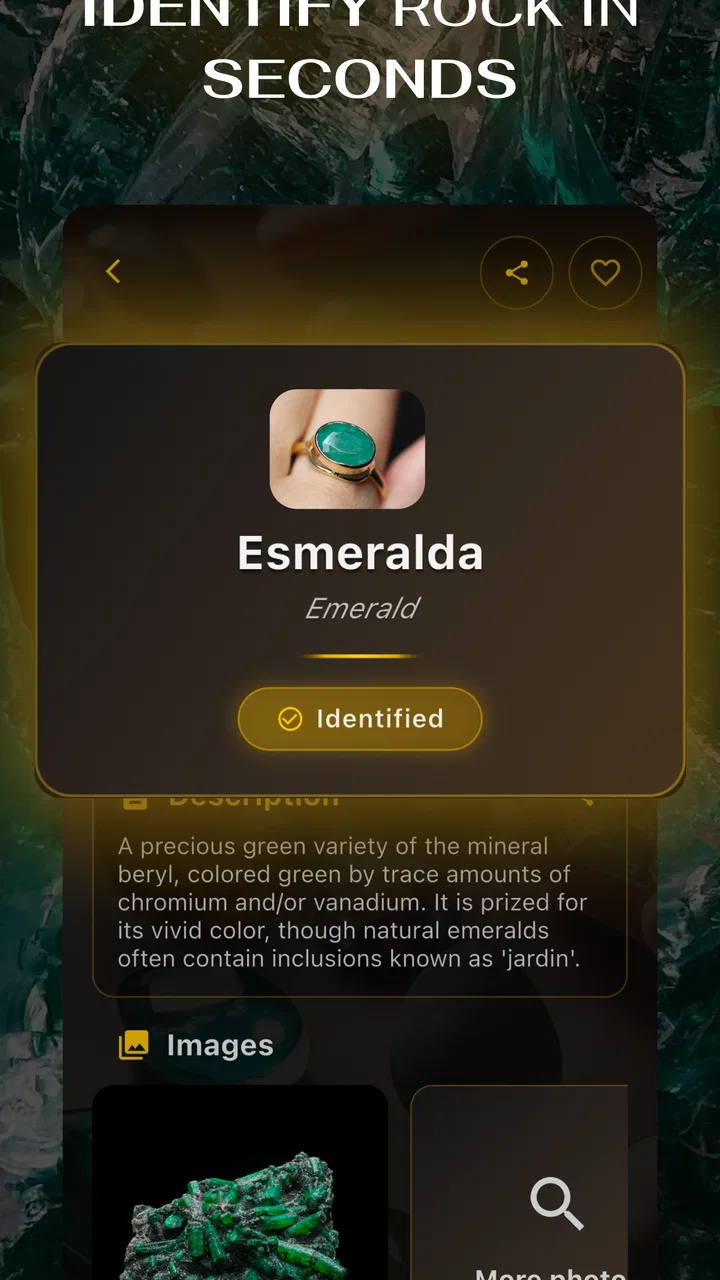
I approached Rock & Crystal Identifier as a beginner rather than as a geologist, which is exactly where this education app makes the most sense. Its purpose is simple: you photograph a rock, crystal, stone, mineral, or gemstone and use the result as a starting point for learning what may be in front of you. I would not treat it as a laboratory instrument, but I found it useful for turning a vague “What is this?” moment into a more focused investigation.
The app is made by SL-Solutions and is available free of charge, with optional in-app purchases ranging from $8.99 to $59.99 per item. It is rated for Everyone, so it is approachable for families, students, casual collectors, and curious hikers. Its audience is reflected in its store performance too: it has an average rating of 4.7 from around 6.3 thousand ratings and has passed 100 thousand installs.
What to expect before identifying your first stone
The most important thing to understand is that this is a visual identification aid, not a replacement for specialist testing. A photograph can show color, shape, texture, and visible patterns, but it cannot reliably reveal every property that separates similar minerals. Lighting can change the apparent color, a dusty surface can hide details, and a polished stone may look very different from the same material in its natural state.
You May Also Like

 Blood Strike: 2.5 Anniversary
Blood Strike’s Loadouts Turn Every Drop Into a Tactical Gamble
A close look at Blood Strike’s custom loadouts: how fast access to signature weapons reshapes its battle royale rhythm, rewards preparation, and narrows the gap between fights.

 Pandora - Music & Podcasts
Pandora’s Music Is Easy to Start, but Harder to Recover
Pandora’s strength is its low-effort path from a seed to a station. Its weak spot is how much confidence it asks you to place in connection, setup, and quiet recovery.

 8 Ball Pool
 Is Built on Rivalries, Rematches, and Routine
A close look at the rivalries, rematches, shared routines, and unanswered safety questions that turn a quick pool match into a persistent mobile community.

 Samsung Music
’s Quiet Strength Is Playing What You Already Own
Its reach comes less from spectacle than from dependable access to a personal library. That simplicity is both the app’s strongest retention engine and its ceiling.

 AccuWeather: Weather Radar
AccuWeather Review: A Quick, Clear Forecast for Everyday Decisions
For everyday plans, the best forecast is the one you can understand quickly. AccuWeather makes rain timing, radar, and local conditions easy to act on, with a few trade-offs.

 Hill Climb Racing
Why Hill Climb Racing Still Turns Crashes Into One More Run
A tiny car, a bumpy hill and one more upgrade: Hill Climb Racing keeps resurfacing because its simple chaos makes every near-miss feel personal.
More From Our News Desk



That limitation does not make the app pointless. In everyday use, it is valuable because it narrows the possibilities quickly. If I find a striking pebble on a walk or receive an unfamiliar crystal as a gift, I usually do not need a formal mineralogical report immediately. I want a sensible first guess, a reason to inspect the object more closely, and enough vocabulary to continue researching. This app is designed for that first step.
I would especially recommend it to someone building a small collection, helping a child learn about geology, or trying to make sense of stones gathered during travel. It can also be handy for classroom discussion when the goal is observation rather than certification. On the other hand, a professional buyer, jewelry appraiser, lapidary worker, or serious collector should use it only as an initial clue and confirm important conclusions through established tests or an expert.
The current version is 7.3.8, and the app supports devices running Android 7.0 or later. That makes it accessible on many older Android phones, although the practical quality of the experience still depends on the camera and screen on the device. A modern phone with a reasonably sharp camera will give you a more useful image than an old handset with a damaged lens or weak focus.
How I would prepare a useful sample
Before opening the camera, I would wipe loose dirt from the stone without changing its surface and place it somewhere with even, neutral light. A window can work well if direct sunlight is not creating harsh reflections. A plain background is better than a patterned table because it keeps attention on the specimen. I would also take off a transparent plastic bag or display case if possible, since glare can obscure the texture the app needs to see.
One of the less obvious lessons is that the “best” photograph is not always the prettiest one. A dramatic close-up with a bright flash may emphasize a single sparkle while hiding the overall structure. I get more useful results by taking a clear image that includes the whole object first. If the stone has a distinctive vein, crystal face, band, or rough edge, I then make a second attempt that shows that feature without losing context.
For a collection, I would keep the physical samples separate while testing them. It is surprisingly easy to photograph one stone and then pick up another while comparing results. A simple handwritten label or a note with the date and location can prevent confusion later. The app can suggest an identity, but only your own record will preserve where the specimen came from and why you thought the result was convincing.
Installing the app and reaching the first meaningful result
The first setup is uncomplicated for a new user: install the app on a compatible Android device, open it, and choose the route that matches the way you want to examine a specimen. The central idea is either using the camera directly or working from a photo. I prefer starting with a saved image when I am indoors because it lets me retake the picture, adjust the arrangement, and compare angles before asking the app to interpret it.
If I am outside and the stone is still in my hand, the camera route is more convenient. I would avoid rushing this part. Hold the object steady, fill enough of the frame to make its features visible, and check that the surface is actually in focus. If the result seems strange, my first response would be to improve the image rather than immediately assuming the app has failed.
My recommended first exercise is a familiar object rather than the most mysterious stone in your collection. Choose something with obvious color and texture, photograph it in good light, and use the result to learn how the app presents an identification. This gives you a reference point for later attempts. It also makes the first session less frustrating because you are learning the workflow and the limits of image recognition at the same time.
Once a result appears, I would read it as a candidate, not a verdict. Compare the suggested name with what you can actually see: Is the surface glassy, dull, fibrous, layered, or granular? Does the color occur naturally through the stone or only on its coating? Does the shape make sense for the proposed material? This habit is more valuable than simply accepting the first label, because it turns the app into a learning tool rather than a guessing machine.
A realistic everyday use case
Imagine finding a pale, translucent pebble beside a trail. You rinse away loose soil, place it on a plain surface, and take a photo with the camera. The app gives you a possible mineral or gemstone category. Instead of telling friends that the stone definitely is that material, you use the suggestion to look at the edges, transparency, and surface marks. You take another photograph from a different angle and see whether the result remains broadly consistent.
That workflow is where I see the real benefit. The app helps you decide what to examine next. It may encourage you to notice a band, a cleavage plane, or a difference between a natural fragment and a polished decorative piece. Even when the first guess is not perfect, the process can still teach you how visual clues affect identification.
For parents, I would turn the result into a small observation game: ask the child to describe the stone before showing the suggested name, then compare those observations with the app. For students, photographing several visually different specimens and writing down why each result seems plausible creates a better exercise than collecting labels alone. The tool becomes most useful when the person using it remains active and skeptical.
Where first-time users can become confused
The biggest source of confusion is likely to be the difference between a visual resemblance and a confirmed identity. Several stones can share a color, and a gemstone may have been cut, polished, dyed, or mounted in a way that hides its natural features. A photograph also cannot communicate hardness, weight, streak, magnetism, or other properties that people commonly use in mineral identification.
For that reason, I would be cautious with transparent or highly reflective specimens. Reflections can dominate the image, while internal inclusions may look like surface marks. Dark stones can lose texture in weak light, and very small samples may not provide enough visible detail. If the app returns an unexpected suggestion, try a cleaner background, softer lighting, and a second angle before drawing a conclusion.
Another practical confusion involves the difference between a rock and one mineral within that rock. A mixed geological material can contain several visible components, while a decorative object may have been shaped or treated. The app’s suggestion should therefore be understood in the context of the photographed object. If you are examining a piece of jewelry, for example, the setting and reflections may matter as much as the stone itself.
I also would not use the app alone to decide whether a valuable-looking gemstone is genuine or whether an item is worth selling. A plausible visual match is not proof of quality, origin, treatment, or market value. That is a situation where a qualified jeweler, gemologist, or mineral specialist is the better option. The app can help you prepare questions, but it should not be the final authority for an expensive purchase or sale.
How to get better results without overcomplicating the process
My first advanced tip is to photograph the same sample in two deliberately different ways: one image showing its overall form and another concentrating on the most distinctive feature. Do not crop away all context in the second image. The comparison can reveal whether the suggested identity depends on a single visual detail or remains plausible when the whole specimen is visible.
My second tip is to test the app against objects whose identity you already know. This is not about trying to “catch” it making a mistake. It helps you learn how reliable its visual suggestions feel with polished, rough, pale, dark, or patterned samples. After a few trials, you will have a better personal sense of when to trust the result as a useful lead and when to treat it very cautiously.
My third tip is to use the app before researching, not after reading a long description of a mineral. If you search first, it is easy to make the photograph fit the name you already expect. Let the image produce a starting hypothesis, then compare that hypothesis with independent descriptions and visible evidence. This keeps the process more honest and makes the educational value stronger.
A fourth useful habit is to record uncertainty. If the app suggests one material but the stone has features that do not match, write both observations down. For a personal collection, notes such as “possible match, but surface is too dull” are more useful than a confident label that may later prove wrong. This is a small workflow change, but it prevents the app from turning guesses into permanent misinformation.
How it compares with familiar alternatives
The usual alternative is a general web search using a photograph. That route can provide more background, but it often produces a wide collection of visually similar images and leaves the user to decide which description applies. This app is more direct for the first pass: it gives the identification task a clear starting point and is easier to use when you are standing outside with a specimen in hand.
A field guide or geology book is better when you want to understand why a mineral looks the way it does. Books encourage comparison of hardness, luster, crystal form, and geological setting, while a camera-based app mainly helps with recognition from an image. I would use both together if I were studying seriously: let the app suggest possibilities, then use a trusted guide to challenge and refine them.
Human communities and specialist forums can be stronger for unusual samples because experienced people may notice details that an automated visual tool misses. Their drawback is that you need to take clear photographs, describe the context, and wait for someone to respond. This app wins on speed and convenience, but specialists win when the identification matters or the specimen is visually ambiguous.
Who should use it and who should choose something else
I think it is a good match for beginners who want an approachable introduction to rock identification, families exploring nature, and casual collectors who need a quick first opinion. It is also suitable for people who learn best by taking action: photograph an object, receive a possible direction, inspect the sample, and then read more about it.
I would be less enthusiastic about recommending it to someone who expects scientific certainty from every photograph. It is also not the right primary tool for professional valuation, authentication, geological fieldwork that requires documented accuracy, or decisions involving expensive gemstones. In those cases, physical testing and expert review are more appropriate than any image-only result.
The free entry point makes it easy to try without committing money immediately, but the presence of optional purchases means I would pay attention to what is offered during use and decide whether the additional value fits your needs. A casual user may be perfectly satisfied with occasional identification attempts, while a dedicated collector may consider extra paid access differently. Either way, I would begin with real samples and a clear purpose rather than paying simply because a result is uncertain.
My next-step recommendation after the first identification
After your first successful action, do not stop at the label. Photograph the sample again, compare the result with what you see, and learn one or two properties associated with the suggested material. If the name seems plausible, save your own note with the specimen’s appearance and where you found it. If it seems doubtful, treat that doubt as the reason to improve the image or consult a more specialized source.
That is the approach I would recommend to a friend: use the app as a friendly front door to mineral learning, not as a final certificate. Its strength is removing the blank-page feeling that comes with an unknown stone. Instead of wondering where to begin, you get a visual hypothesis that can guide your next observation.
SL-Solutions has made a focused education app that is easy to understand and useful in the moment. It will not replace a loupe, field guide, testing kit, or qualified expert, and reflective, treated, or visually similar specimens can still create uncertainty. Nevertheless, for a free first step on a compatible Android phone, I find it worthwhile. Use the image result as a clue, verify important claims independently, and the app becomes much more valuable than a simple name generator.
FAQs for Rock & Crystal Identifier App
01What is the Rock & Crystal Identifier app used for?
Rock & Crystal Identifier is designed to help you recognize rocks, minerals, crystals, and gemstones using your phone’s camera. After taking or uploading a photo, the app compares visible characteristics such as color, texture, shape, and surface patterns with its identification database. It can be useful for beginners, collectors, students, hikers, and anyone curious about a specimen they have found.
02How accurate is the identification provided by the app?
The app can offer helpful suggestions, but its results should not be treated as a professional geological or gemological verification. Image quality, lighting, camera angle, unusual specimens, and similar-looking minerals can affect the outcome. For better results, photograph the sample clearly from several angles and compare the description with reliable references. Valuable or rare stones should always be examined by an expert.
03Does Rock & Crystal Identifier require an internet connection?
Some features may work differently depending on the version of the app and the device being used. Photo-based identification commonly requires an internet connection because images may be processed through online recognition systems or updated databases. Before heading outdoors, check which tools are available offline. Mobile data charges may also apply if you identify specimens away from a Wi-Fi connection.
04Is the Rock & Crystal Identifier app free to download and use?
The app may be available as a free download, but certain features can be limited by advertisements, daily identification allowances, locked information, or optional premium subscriptions. Before confirming a purchase, review the pricing, billing period, and cancellation terms shown in the app store. Users should also check whether a free trial automatically changes into a paid subscription.
05What should I do to get the best identification results?
Use bright, even natural light and place the specimen against a simple background before taking a picture. Clean away dust when it is safe to do so, avoid strong reflections, and make sure the entire object is in focus. Taking multiple photos of the front, side, and surface can provide more useful information. Include visible features such as crystal shape, streaks, layers, or inclusions.
Pros
- Identifies many common rocks and crystals from a single photo.
- Provides useful details about appearance
- composition
- and typical uses.
- Simple interface makes it accessible for beginners and casual collectors.
- Helpful for organizing discoveries while exploring outdoors.
- Fast results make quick field identification convenient.
Cons
- Photo quality and lighting can strongly affect identification accuracy.
- Rare or unusual specimens may be labeled incorrectly.
- Some features or detailed information may require a subscription.
- The app cannot replace expert testing for valuable specimens.
- Results may be less reliable when crystals are partially obscured.

Rock & Crystal Identifier App
Gallery